

Cool Band Vol 2 · Mosaico Musical Vol 2200155
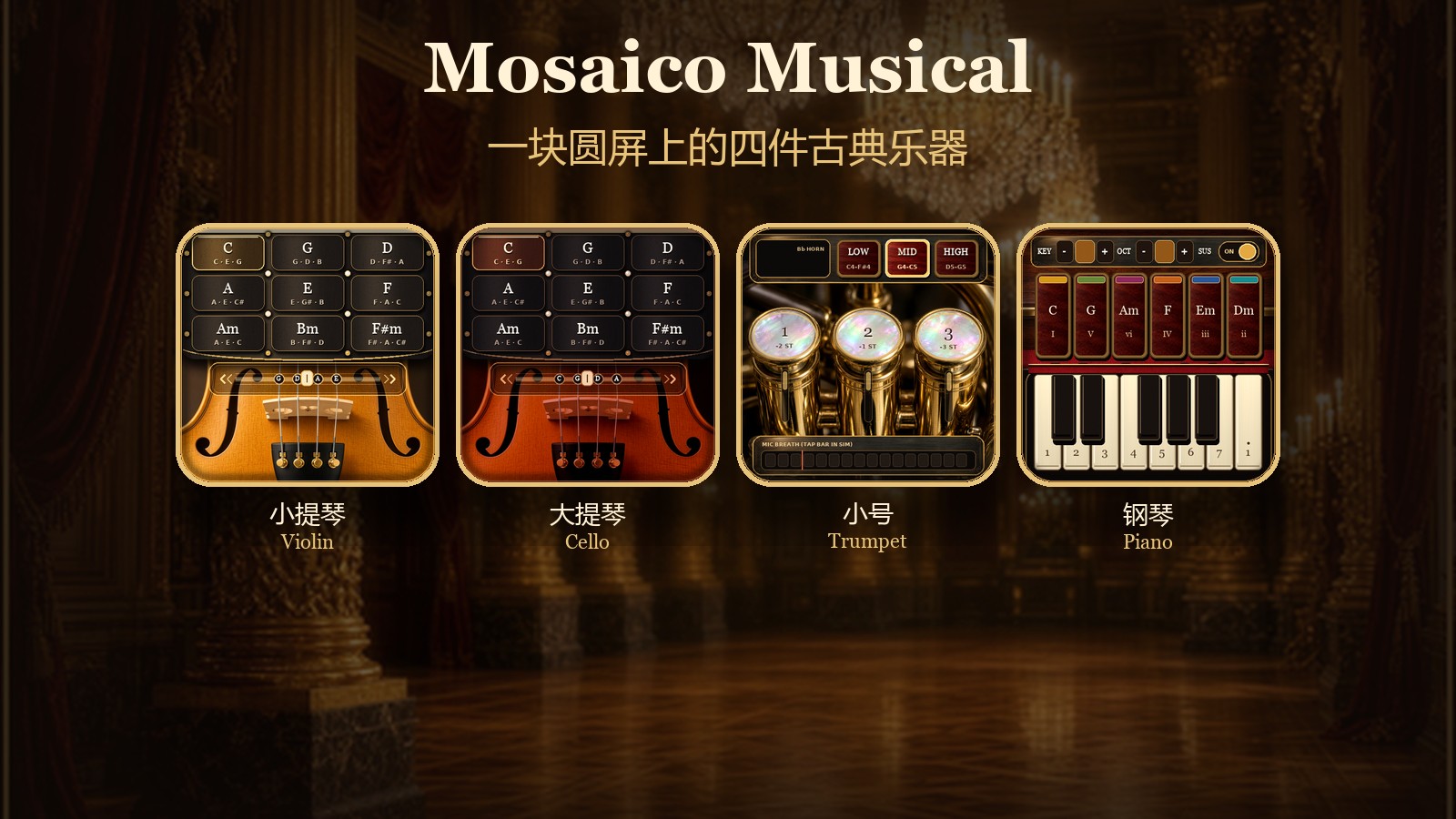
The violin, cello, trumpet, and piano on Mosaico. When the fingers slide along the bow track, the sound continues to resonate; when blowing into the microphone, the trumpet sustains its tone, and the piano uses two fingers to play chords and keys.
Mosaico Musical Vol2 · Classical Quartet
A 480×480 screen displays a violin, a cello, a trumpet, and a piano. When the bow slides under a finger, the strings sound continuously; blowing into the device’s microphone holds a sustained trumpet note; the piano produces chords and single notes by tapping. Changing chords, pressing a piston, or opening an instrument produces a short vibration.
This version is a solo on a single ESP-Mosaico. The screen tracks two touch points simultaneously: one finger holds a chord pad while the other slides on the bow rail, or two trumpet pistons can be held down. A third finger is not reported by the touch glass in this version.
Operation Guide
Choose an Instrument
When powered on, the device stops on the salon instrument selection page. Tap the cards on either side, or press and hold the bottom knob and drag along its arc; about 24 ° of rotation switches to the next instrument. A light tap on the knob with almost no rotation steps backward when tapped left of center and forward when tapped right of center. The order is violin, cello, trumpet, piano. Tap the large central card to enter. The battery percentage on the salon page refreshes automatically.
Briefly press the device AI key to pull down the control drawer from the top of the screen; press it again to close it. When the drawer is open, the current instrument is silenced. Tapping the area below the drawer closes the drawer while keeping you on the current instrument. Tapping Return to Grand Ballroom closes the drawer and returns to the salon.
In the control drawer you can drag Volume and Luster: the former controls speaker volume, the latter screen brightness. On power‑up they start around 88 and 82 respectively. ToF Bow & Tactile Pulse is on by default. Without a distance board, bowing still works via finger sliding; turning this switch off also stops the key vibration. When you long‑press the AI key, if the distance board is reporting a value, that distance is recorded as the bow’s rest point.
The drawer shows Chamber Duo, Swap L / R, and End Duo. This build does not communicate with a second device, so tapping these will not pair or split left/right parts.
Violin
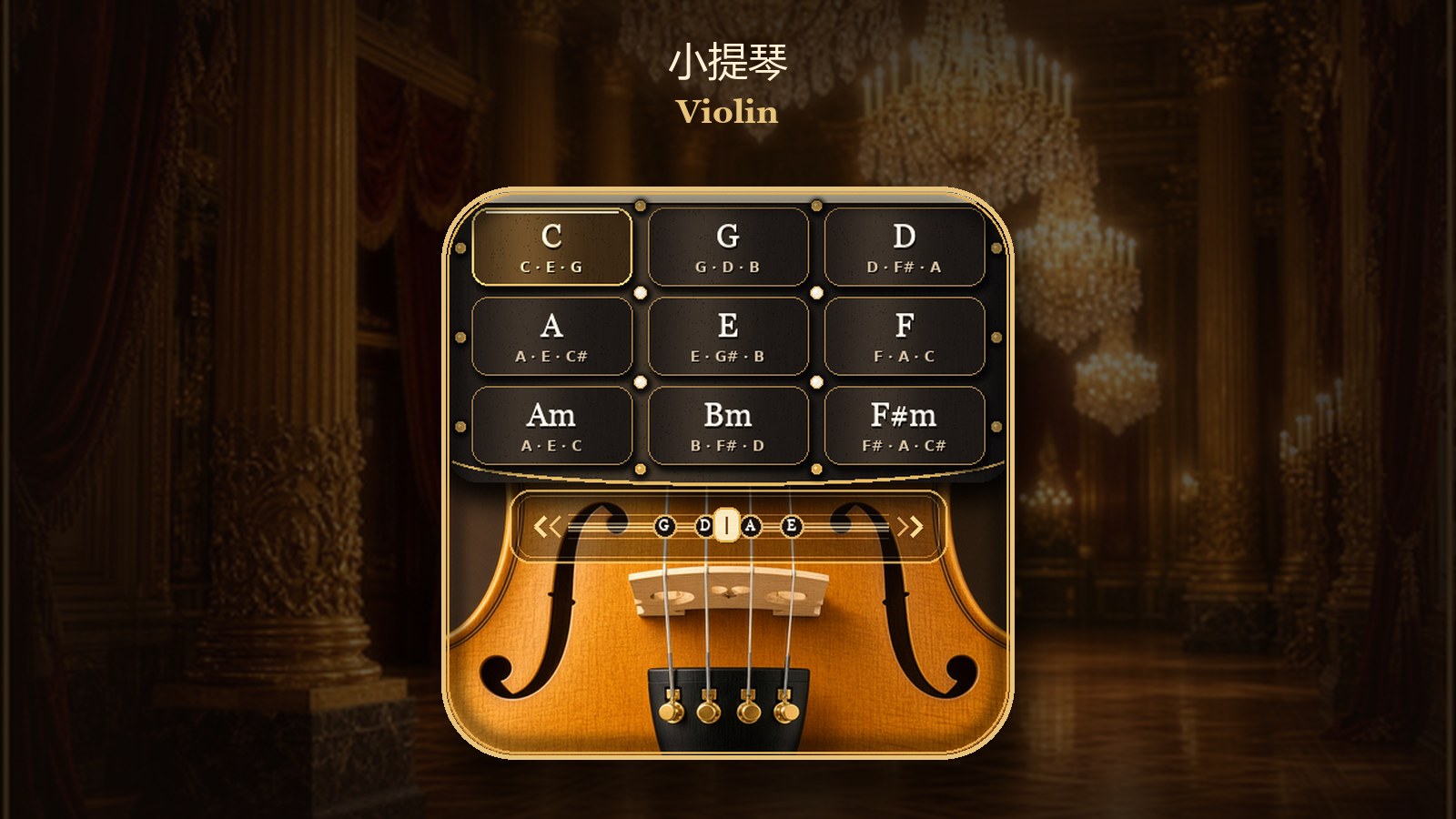
The upper half of the screen is a 3 × 3 chord pad grid; reading left‑to‑right, top‑to‑bottom the chords are C, G, D, A, E, F, Am, Bm, F♯m. Tapping a pad lights it and gives a brief vibration. Tapping the same pad again does not retrigger.
The lower half is the bow rail, starting roughly at vertical pixel 248, with the bridge and nut below. A finger must slide left‑right along this rail to produce sound: placing the finger without movement yields no sound; the faster the slide, the louder the volume, up to a limit. A small slider on the rail follows the lowest finger and indicates bow position only; it does not select which string is played.
While the bow is still pressed, switching to another chord pad changes the whole set of notes without needing to lift the finger first. If the finger pauses on the bow rail for about 90 ms, the sound begins a decay of roughly 1.4 s, then stops when the finger is lifted. After lifting, if the touch disappears for less than about 80 ms, the bow is still considered pressed; only a longer gap triggers decay. Opening the control drawer or leaving this page stops sound immediately.
Two fingers can be used simultaneously: one holds a chord pad, the other slides on the bow rail.
Cello
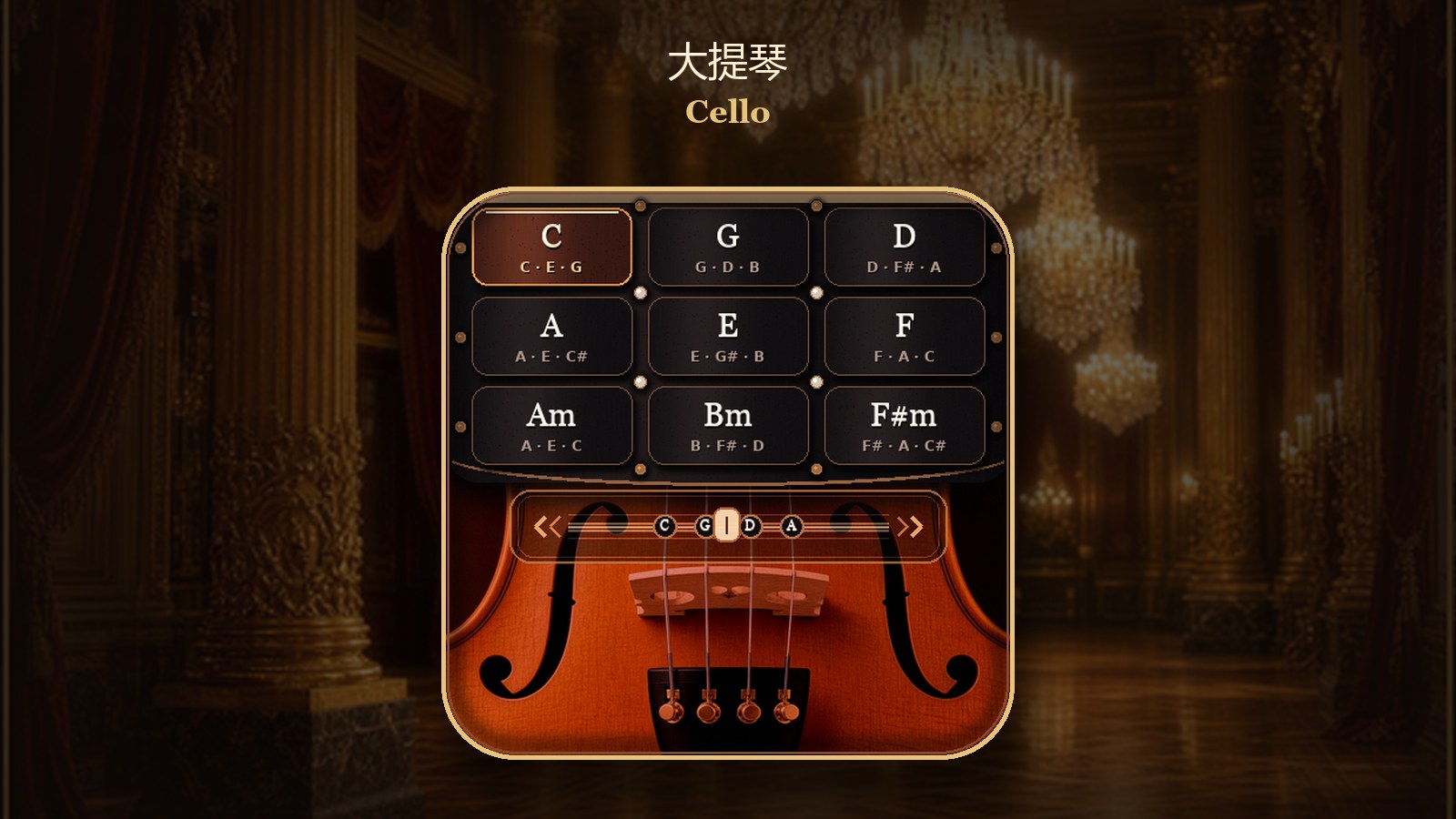
The layout is the same as the violin page, and the bow rail and slider work identically. The chord pads are also C, G, D, A, E, F, Am, Bm, F♯m, while the nut markers on the bow rail are labeled C, G, D, A, giving a lower pitch range. Changing chords while bowing connects the new set of notes, and the volume is a bit fuller than on the violin when switching chords. The decay rules for stopping the bow, brief touch loss, and leaving the page are the same as for the violin.
Trumpet
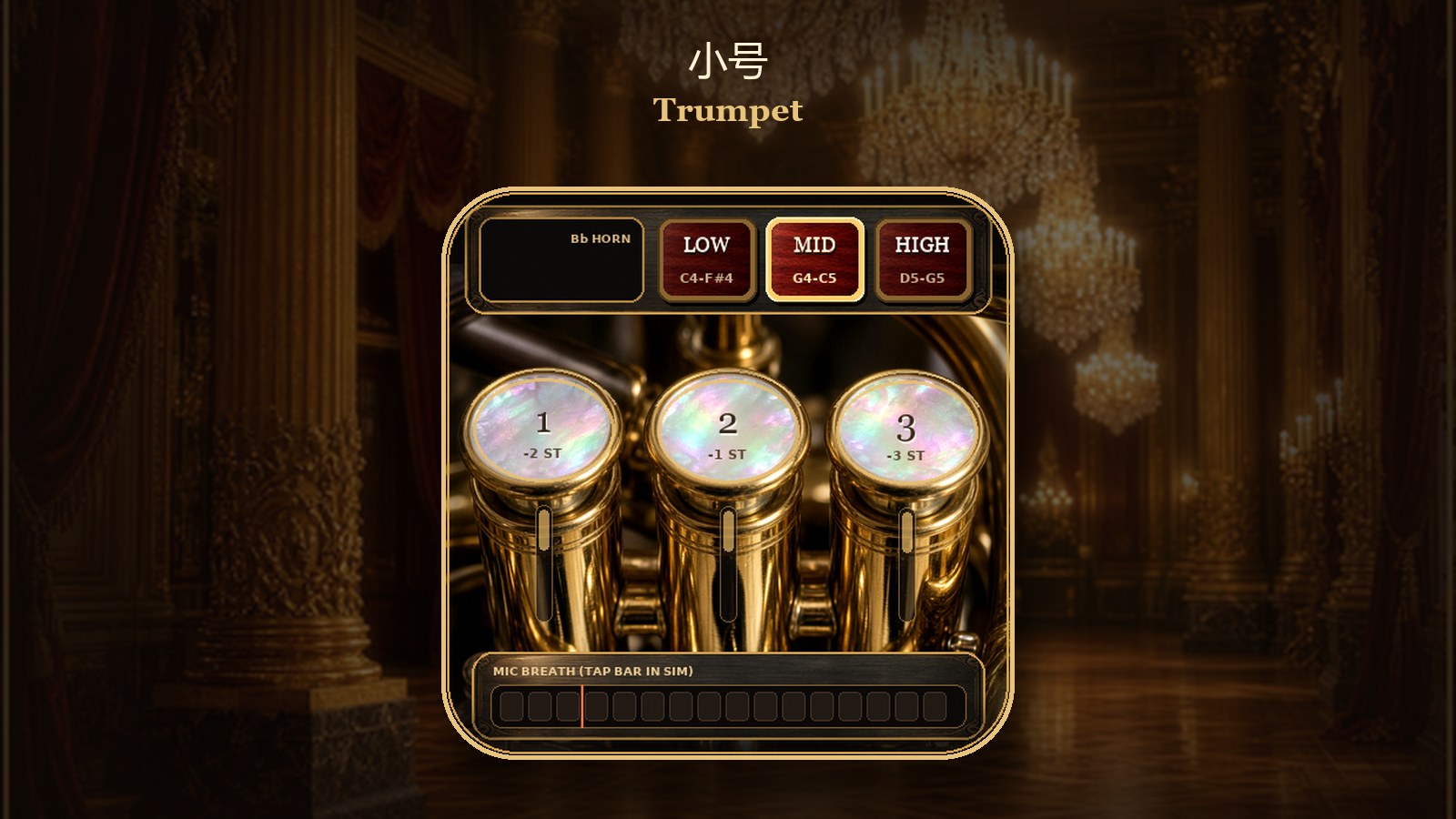
Blow into the device’s microphone. Once the airflow is stable enough, the airflow bar at the bottom of the screen lights up and shows the valve open; the note sustains continuously and does not restart every few hundred milliseconds. Normal room noise should not open the valve. If the airflow drops briefly, the note remains connected for roughly up to 280 ms; longer drops, leaving the page, or opening the control drawer will cut the sound. Greater airflow yields higher volume.
The three pistons are spring‑return: they stay down only while pressed, and pop up when released. The screen tracks only two touch points at once, so you can hold down any two pistons; a third finger placed on the glass will not register a third point. Piston 1 lowers the pitch by two semitones, piston 2 by one semitone, piston 3 by three semitones; when pressed together the intervals add. The note name, fingering, and Hz displayed on the panel update accordingly.
LOW / MID / HIGH are latched registers; tapping switches to the selected register without spring‑returning on release. The device powers up in MID. With no valve pressed, the three registers start at E4, G4, and D5 respectively, and the note name shown on the panel is the actual sounding pitch.
The bottom airflow bar can also be pressed with a finger, acting as an approximate 0.9‑second simulated breath; releasing ends the simulated airflow. Real playing still uses the microphone.
Piano
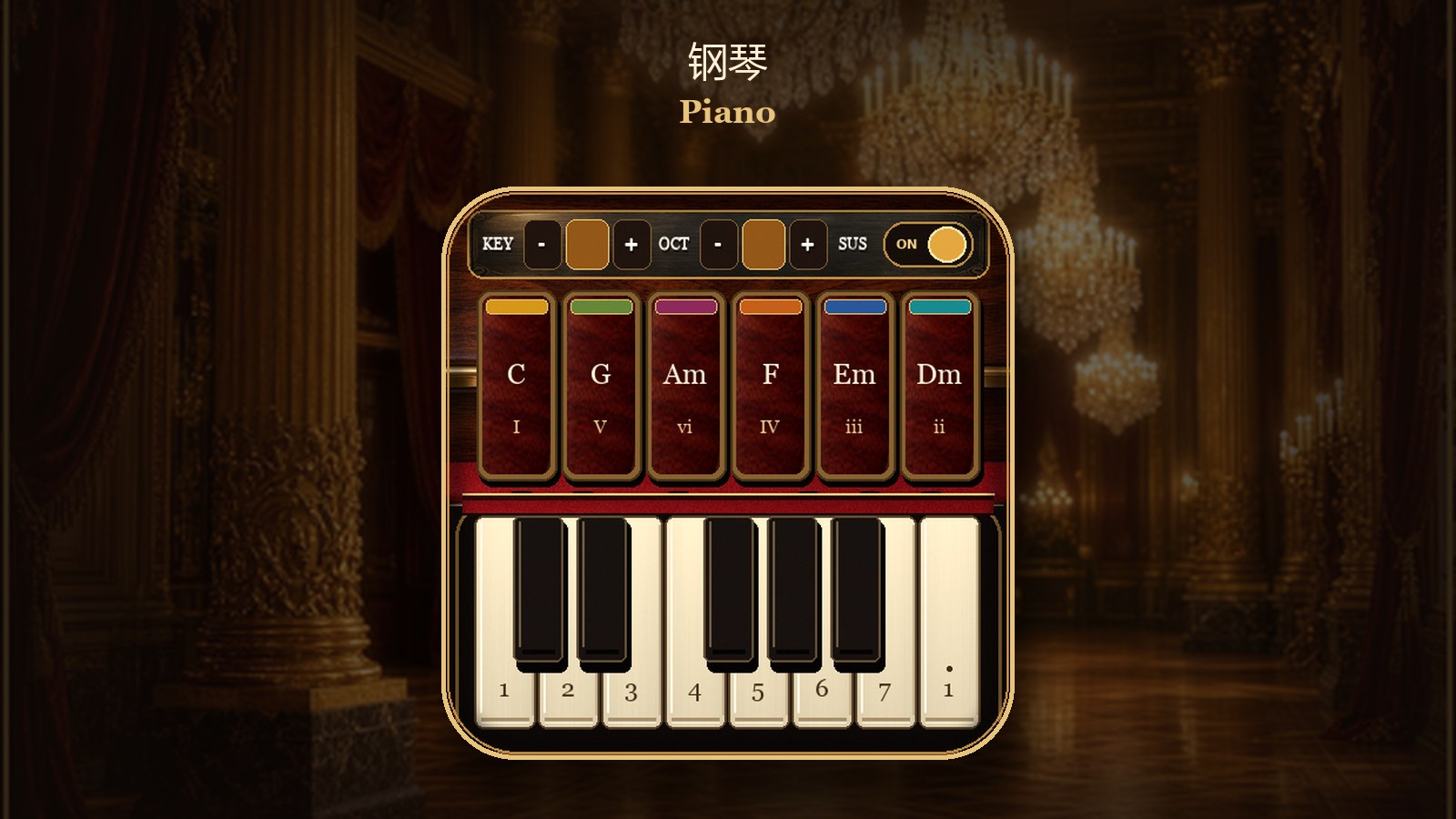
Top row: KEY − / + transposes down/up, cycling through twelve keys; OCT − / + shifts octaves within the range 3 to 5, and further taps at the ends have no effect; SUS is sustain, on by default at power‑up. When sustain is on, later notes do not cut off earlier ones. When off, pressing the same key again replaces the previous note on that key. Regardless of the switch, releasing a key does not cause an extra note‑off: the piano sounds when a key is pressed and the sample stops on its own.
The middle six chord pads, in C major from left to right, are C, G, Am, F, Em, Dm, labeled I, V, vi, IV, iii, ii beneath them. After transposition, these six functions follow the current key. Tapping a pad instantly triggers a triad; holding does not repeat, and releasing does not cut the chord.
Below are the white and black keys. White keys are labeled 1 through 7, with an additional high‑octave 1 at the far right. Black keys sit above their corresponding white keys; tapping a black‑key area plays a sharp/flat. Each key triggers only on the initial tap; holding does not repeat. Two fingers can simultaneously tap two chord pads, two piano keys, or one pad plus one key.
Usage Tips
- The bow’s slider follows the finger but does not affect pitch.
- The trumpet requires a continuous breath; do not expect short, staccato bursts. This version produces one sustained note per breath.
- When changing registers or piston combinations, the old note fades out over roughly 0.2 s before the new note starts.
- When the control drawer is open, bowing, blowing, and piano input are ignored.
Future Pairing
A distance board can be attached later. When the board is connected and the switch in the drawer is on, the bow’s force can follow distance changes, and a long press of the AI key can record the current distance as the rest point. Even without the board, full performance is possible, with the bow operated by finger sliding on the rail.
A joystick board is not a control method for this version.
Technical Overview
- Target hardware: ESP-Mosaico (ESP32‑S31)
- Category: Audio‑Visual
- Firmware format: Iris
- Version: 1.0.0
- License: Apache‑2.0
- Performance: Standalone. Two touch points on the screen
Mosaico Musical
Four instruments share one 480×480 round screen: violin, cello, trumpet, and piano. A finger sliding on the bow rail keeps a string chord sounding, breath into the onboard microphone holds a sustained trumpet note, and the piano speaks in tapped chords and keys. Changing a chord, pressing a piston, or opening an instrument gives a short vibration.
This version is a solo on one ESP-Mosaico. The glass reports two touches at once, so one finger can hold a chord pad while the other bows, or two trumpet pistons can stay down together. A third finger is not reported.
How to play
Choose an instrument
The device opens on the salon picker. Tap the card on either side, or drag the bottom knob along its arc: about 24 degrees of travel steps to the next instrument. A light tap on the knob, with almost no drag, steps backward on the left of center and forward on the right. The order is violin, cello, trumpet, piano. Tap the large center card to enter. The battery percentage on this page refreshes on its own.
A short press of the AI key pulls the control drawer down from the top. Another short press closes it. While the drawer is open, the current instrument goes silent. Tap the screen below the drawer to close it and stay on the instrument. Return to Grand Ballroom closes the drawer and returns to the salon.
Drag Volume for the speaker and Luster for the backlight. They start near 88 and 82. ToF Bow & Tactile Pulse is on by default. Without a distance board, bowing is still the finger on the rail; turning the switch off also stops the vibration. A long press of the AI key stores the current distance as the bow’s rest point when the board is reporting one.
The drawer shows Chamber Duo, Swap L / R, and End Duo. This build does not talk to a second device. Those controls do not pair and do not split a left and right part.
Violin
The upper half is a 3×3 pad of chords, row by row: C, G, D, A, E, F, Am, Bm, F#m. Tap a pad to light it. The same pad does not retrigger while it stays down.
The lower half is the bow rail, from about y = 248 down across the bridge. Sound starts only when a finger slides sideways on that rail. A fresh touch with no travel is silent. A faster slide is louder, up to a cap. The small thumb on the rail follows the lowest finger. It shows where the bow is and does not choose the string.
Tap another chord while the bow is still moving and the whole chord changes without a release. Hold still on the rail for about 90 milliseconds and the note falls away over about 1.4 seconds. If the glass drops the finger for less than about 80 milliseconds, the stroke continues. Opening the drawer or leaving the page stops the sound immediately.
Two fingers work together: one on a chord pad, one on the rail.
Cello
The cello page uses the same pads, rail, and thumb. The chords are the same names, the rail badges read C, G, D, A, and the notes sit lower. Changing chord while the bow is moving brings in the new chord a little fuller than on the violin. The still-bow, short-dropout, and leave-page behavior matches the violin.
Trumpet
Blow at the onboard microphone. When the breath is steady enough, the airflow bar lights and the gate opens. The note holds as one continuous tone. It does not restart every few hundred milliseconds. Ordinary room noise should not open the gate. A short dip shorter than about 280 milliseconds keeps the same tone. A longer gap, leaving the page, or opening the drawer ends it. More breath is louder.
The three pistons spring back: a piston stays down only while a finger covers it. The glass tracks two touches, so two pistons can be held. A third finger does not produce a third point. Piston 1 lowers the note by 2 semitones, piston 2 by 1, piston 3 by 3, and the drops add. The on-screen note name, fingering, and Hz follow.
LOW / MID / HIGH stay latched until another register is tapped. The device starts on MID. Open pistons begin at E4, G4, and D5. The printed note is the sounding pitch.
The bottom airflow bar can be held with a finger as a stand-in breath of about 0.9 seconds. Real playing uses the microphone.
Piano
The top row has KEY − / +, which walks through all twelve keys, and OCT − / +, which moves the octave from 3 to 5 and stops at the ends. SUS is sustain, on at boot. While it is on, a new note does not cut off the notes already speaking. While it is off, playing the same key again replaces that key’s previous note. Releasing a finger does not send a separate note‑off. Piano notes are plucks and finish with the sample.
The six pads in C are C, G, Am, F, Em, Dm, marked I, V, vi, IV, iii, ii. After a key change they follow the new key as the same scale degrees. A pad plays its triad once on the way down. Holding it does not repeat, and releasing it does not choke the chord.
The keyboard has white keys labeled 1 through 7 and one more 1 an octave higher. Black keys sit over the gaps and play the accidentals. Each key triggers once per new touch. Two fingers can strike two pads, two keys, or a pad and a key together.
On‑screen notes
- The bow thumb follows the finger and does not change the pitch.
- Trumpet expects a continuous breath, not a series of short tongued attacks.
- A new register or piston combination lets the old note go over about 0.2 seconds, then starts the new one.
- With the drawer open, bowing, breath, and piano touches are not played.
Later pairing
A distance board can be added later. With the drawer switch on, bow loudness can follow that distance, and a long press of the AI key stores the current reading as the rest point. The finger on the rail is enough without the board.
A joystick board is not how this build is played.
Specs
- Hardware: ESP-Mosaico (ESP32-S31)
- Category: Audio & Video
- Firmware: Iris
- Version: 1.0.0
- License: Apache-2.0
- Performance: one device, two reported touches
Comments (0)