

Mosaico Musical Vol2 · 古典四重奏
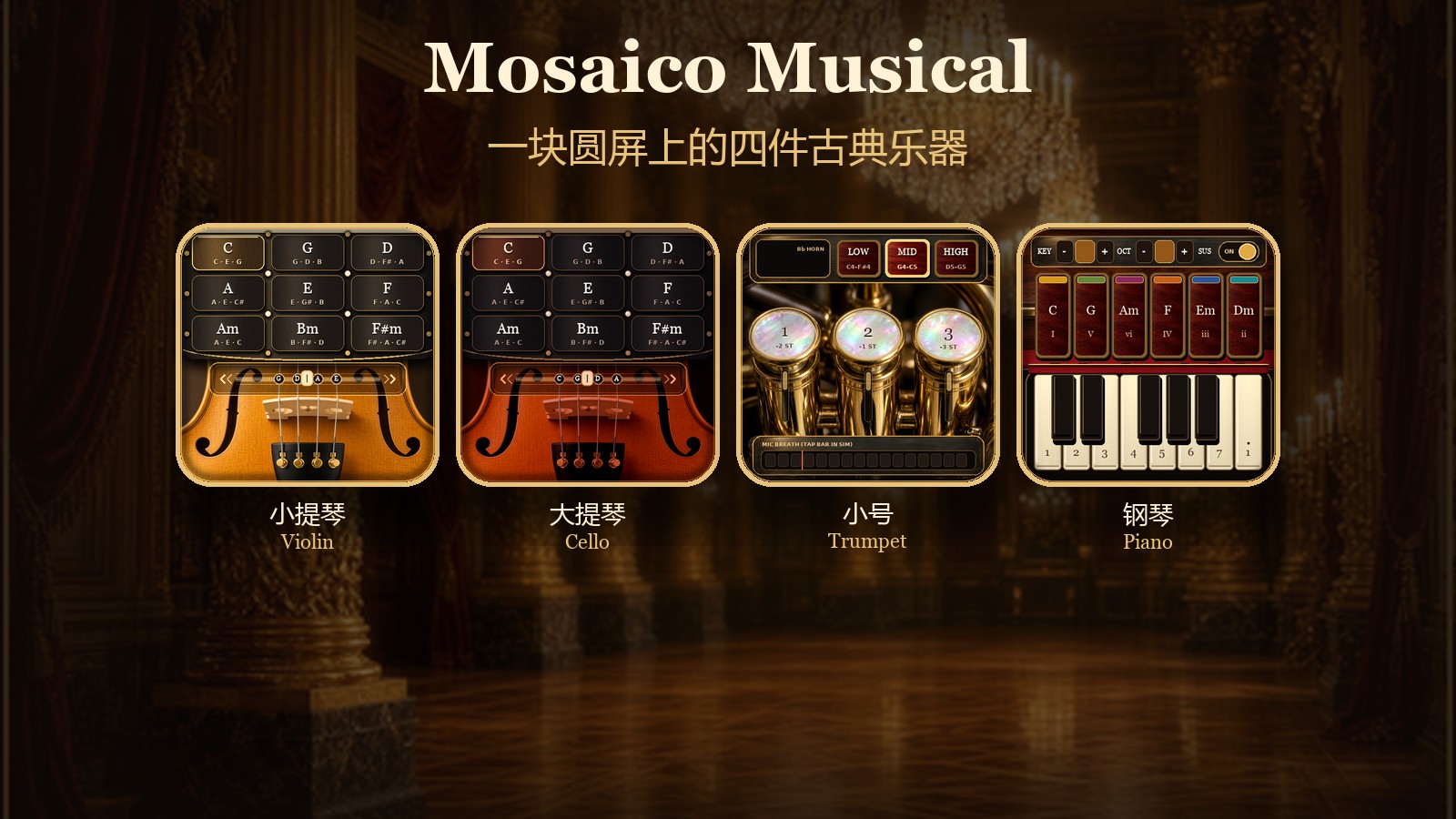
一块 480×480 的屏,上面是小提琴、大提琴、小号和钢琴。弓在手指下滑动时,弦乐会连着响;对着机身麦克风吹,小号保持一个持续的音;钢琴用点按弹出和弦和单音。换和弦、按下活塞和拧开乐器时会有短振动。
这一版在单台 ESP-Mosaico 上独奏。屏幕同时跟踪两路触点:一根手指按和弦、另一根在弓轨上拉,或者按住小号的两个活塞。第三根手指这一版的触摸玻璃不会报上来。
操作指南
进入乐器
开机停在沙龙选琴页。左右点两侧的卡片,或按住底部旋钮沿圆弧拖动,每转过大约 24 度就换一件乐器;在旋钮上轻点一下、几乎没有转动时,点在中线左边往前一件,点在右边往后一件。顺序是小提琴、大提琴、小号、钢琴。点中间那张大卡进入。沙龙页上的电量百分比会自己刷新。
短按机身 AI 键,从屏幕上方拉下控制层,再短按一次把它收起。控制层打开时,当前乐器停声。点控制层以下的画面,只收起控制层,人还留在这件乐器上。点 Return to Grand Ballroom 会收起控制层并回到沙龙。
控制层里可以拖 Volume 和 Luster:前者是喇叭音量,后者是屏幕亮度。开机时音量约在 88、亮度约在 82。ToF Bow & Tactile Pulse 默认开着。没插测距子板时,弓仍然靠手指滑动;这个开关关掉以后,按键振动也会一起停。长按 AI 键时,如果测距子板正有一个读数,那个距离会被记成弓的静止点。
控制层上能看到 Chamber Duo、Swap L / R 和 End Duo。这一版没有和第二台设备通信,这三处点了不会配对,也不会分左右声部。
小提琴
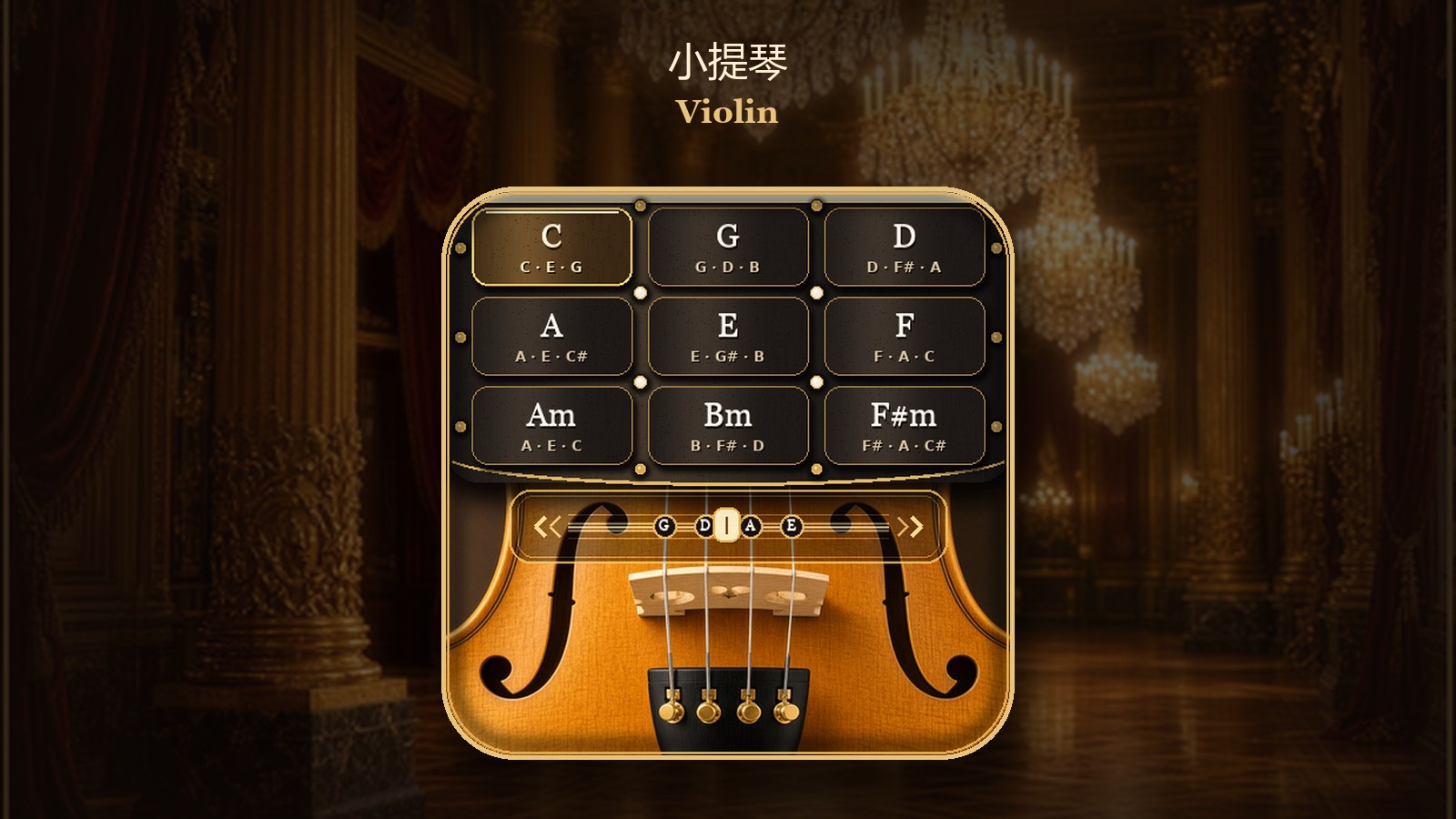
上半屏是 3×3 和弦垫,从左到右、从上到下是 C、G、D、A、E、F、Am、Bm、F#m。点一个垫,它会亮起,并带一下短振动。点同一个垫不会重触发。
下半屏是弓轨,大约从纵向 248 像素开始,下面是琴码和弦枕。手指必须在这条弓轨上左右滑动才会出声:刚放上去、还没有位移时不出声;滑动越快,音量越高,但有上限。弓轨上的小滑块跟着最靠下的那根手指走,它只表示弓的位置,不负责选哪根弦。
弓还按着的时候改点另一个和弦,整组音会换过去,不用先松手。手指在弓轨上停住大约 90 毫秒,声音进入大约 1.4 秒的衰减,然后松开。手指抬起后,触摸若只丢了不到约 80 毫秒,这一弓还算按着;超过这个空隙才开始衰减。打开控制层或离开本页会立刻停声。
两根手指可以同时用:一根按和弦垫,一根在弓轨上拉。
大提琴
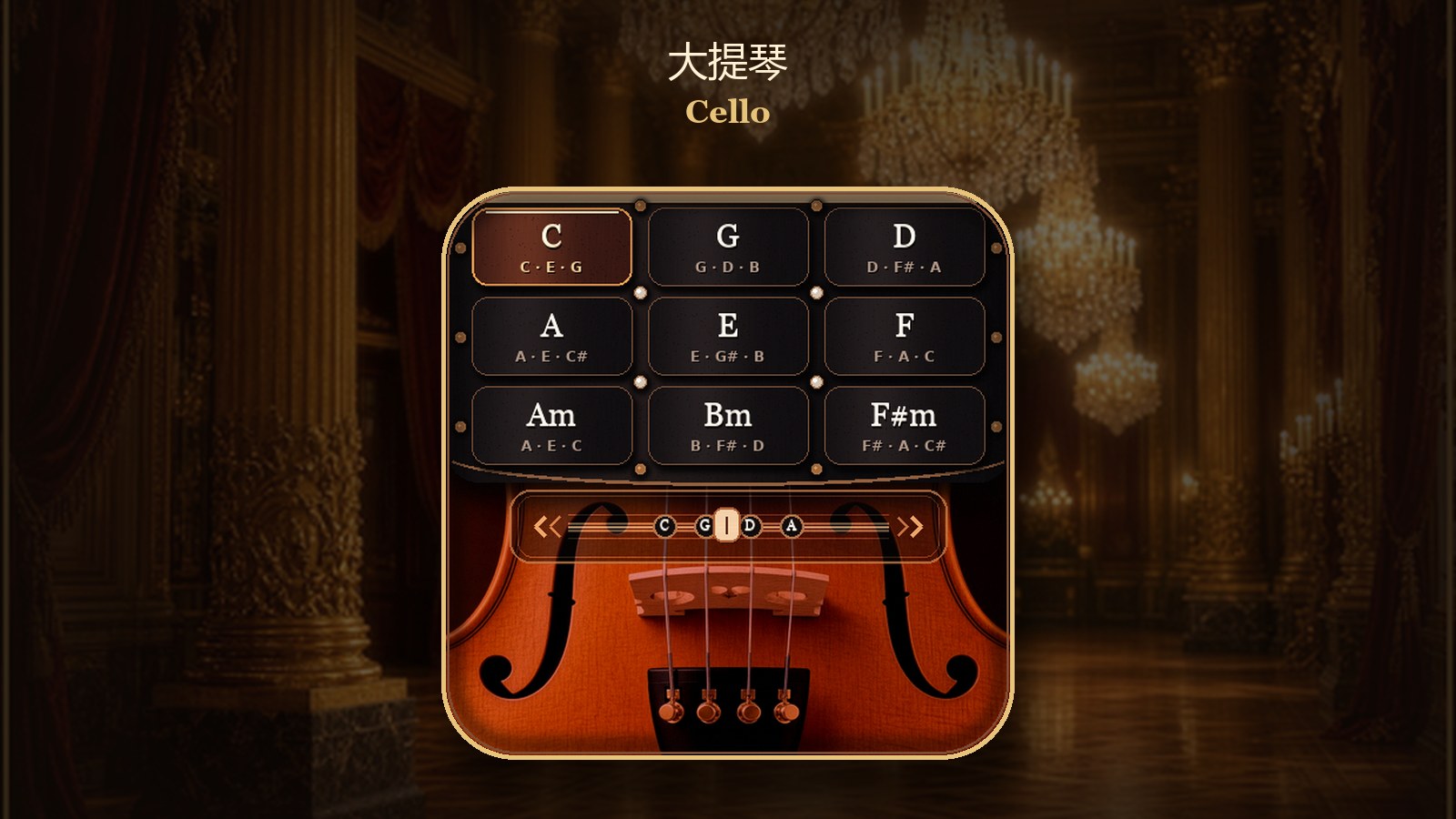
和大提琴页的布局相同,弓轨和滑块的用法也一样。和弦垫同样是 C、G、D、A、E、F、Am、Bm、F#m,弓轨上的弦枕标的是 C、G、D、A,音区更低。正在拉的时候换和弦,新的一组音会接上,音量比小提琴换和弦时更满一些。停弓、短丢点和离开页面的衰减规则与小提琴相同。
小号
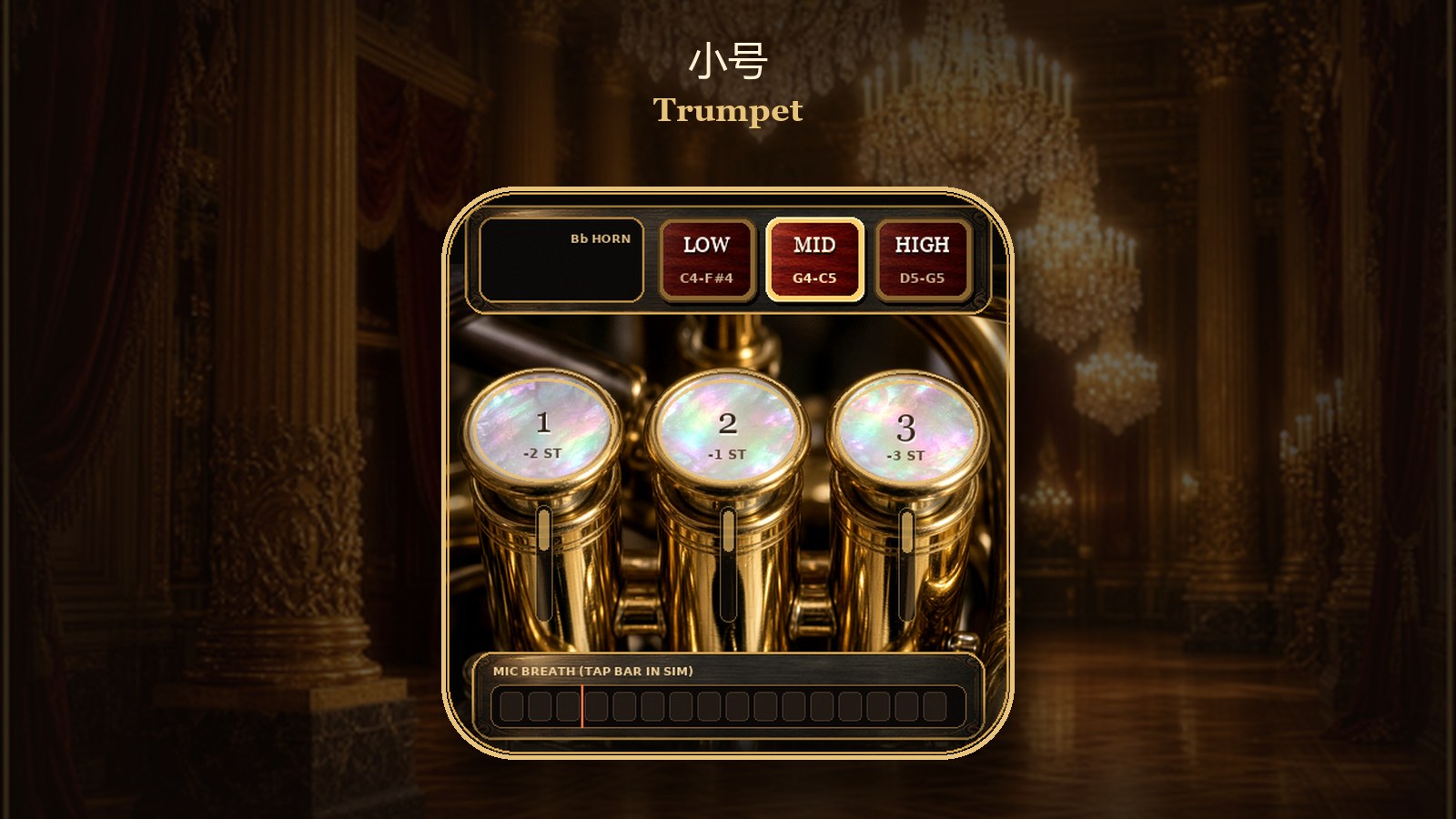
对机身麦克风吹。气流足够稳定后,屏幕下方的气流条亮起,并显示气门打开;音会一直连着,不会每隔几百毫秒重新起吹。普通房间噪声不应该把气门吹开。气流短掉一下时,大约 280 毫秒以内音还连着;超过这个时间,或者离开本页、打开控制层,音才收掉。气流越大,音量越高。
三个活塞是回弹的:手指按住才下去,松开就弹起。屏幕同时只跟踪两路触点,所以可以按住其中两个活塞;第三只手指按上去,玻璃不会给出第三个点。活塞 1 降 2 个半音,活塞 2 降 1 个半音,活塞 3 降 3 个半音,同时按下时这些降幅相加。面板上的音名、指法和 Hz 会跟着变。
LOW / MID / HIGH 是锁存的音区,点一下换过去,不会松手回弹。开机停在 MID。空管时三个音区分别从 E4、G4、D5 起算,面板上的音名就是实际响的音。
最底下那条气流条也可以用手指按住,当作大约 0.9 秒的模拟吹气;松手后这段模拟气会结束。真的吹奏还是用麦克风。
钢琴
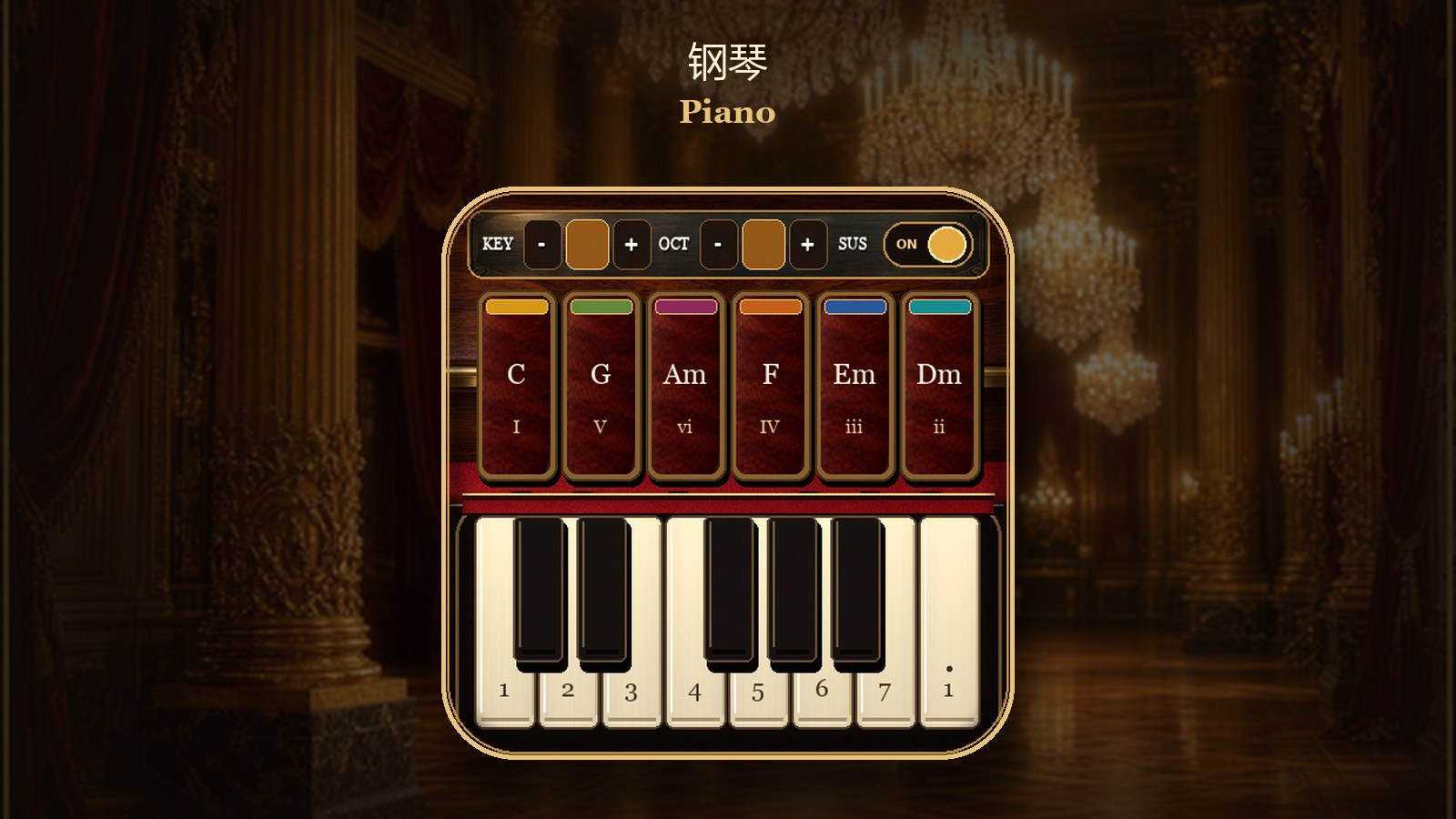
上方一排:KEY − / + 升降调,十二个调循环;OCT − / + 改八度,范围是 3 到 5,到头再点不会越过去;SUS 是延音,开机默认开着。延音开着时,后按下的音不会把前面的音掐掉。关掉以后,同一个琴键再按会换掉这个键上一次的音。无论开关,松手都不会再额外停一次音:钢琴是拨下去就响,由采样自己收掉。
中间六个和弦垫,在 C 调时从左到右是 C、G、Am、F、Em、Dm,下面标着 I、V、vi、IV、iii、ii。换调以后,这六个功能跟着当前调走。点下去的瞬间弹出三音和弦,按住不放不会连发,松手也不会把和弦掐掉。
下方是白键和黑键。白键上标着 1 到 7,最右边再有一个高八度的 1。黑键盖在对应的白键上方,点黑键区域弹的是升降音。每个键也是点下才触发一次,按住不连发。两根手指可以同时点两个和弦垫、两个琴键,或一个垫加一个键。
应用提示
- 弓的滑块只跟着手指,不改变音高。
- 小号要连续的气,不要期待短促的连吐;这一版是一口气一个持续音。
- 换音区或换活塞组合时,旧的音会在大约 0.2 秒里让开,新的音再起吹。
- 控制层打开时,弓、吹气和钢琴都不再接收演奏触控。
后续搭配
后续可以插测距子板。子板接上并且抽屉里的开关开着时,弓的力度可以跟距离变化走,长按 AI 键能把当前距离记成静止点。不插子板也可以完整演奏,弓用手指在轨道上滑。
摇杆子板不是这版的操作方式。
技术一览
- 目标硬件:ESP-Mosaico(ESP32-S31)
- 分类:音频影像
- 固件格式:Iris
- 版本:1.0.0
- 许可证:Apache-2.0
- 演奏:单机。屏幕两路触点
Mosaico Musical
Four instruments share one 480×480 round screen: violin, cello, trumpet, and piano. A finger sliding on the bow rail keeps a string chord sounding, breath into the onboard microphone holds a trumpet note, and the piano speaks in tapped chords and keys. Changing a chord, pressing a piston, or opening an instrument gives a short vibration.
This version is a solo on one ESP-Mosaico. The glass reports two touches at once, so one finger can hold a chord pad while the other bows, or two trumpet pistons can stay down together. A third finger is not reported.
How to play
Choose an instrument
The device opens on the salon picker. Tap the card on either side, or drag the bottom knob along its arc: about 24 degrees of travel steps to the next instrument. A light tap on the knob, with almost no drag, steps backward on the left of center and forward on the right. The order is violin, cello, trumpet, piano. Tap the large center card to enter. The battery percentage on this page refreshes on its own.
A short press of the AI key pulls the control drawer down from the top. Another short press closes it. While the drawer is open, the current instrument goes silent. Tap the screen below the drawer to close it and stay on the instrument. Return to Grand Ballroom closes the drawer and returns to the salon.
Drag Volume for the speaker and Luster for the backlight. They start near 88 and 82. ToF Bow & Tactile Pulse is on by default. Without a distance board, bowing is still the finger on the rail; turning the switch off also stops the vibration. A long press of the AI key stores the current distance as the bow’s rest point when the board is reporting one.
The drawer shows Chamber Duo, Swap L / R, and End Duo. This build does not talk to a second device. Those controls do not pair and do not split a left and right part.
Violin
The upper half is a 3×3 pad of chords, row by row: C, G, D, A, E, F, Am, Bm, F#m. Tap a pad to light it. The same pad does not retrigger while it stays down.
The lower half is the bow rail, from about y = 248 down across the bridge. Sound starts only when a finger slides sideways on that rail. A fresh touch with no travel is silent. A faster slide is louder, up to a cap. The small thumb on the rail follows the lowest finger. It shows where the bow is and does not choose the string.
Tap another chord while the bow is still moving and the whole chord changes without a release. Hold still on the rail for about 90 milliseconds and the note falls away over about 1.4 seconds. If the glass drops the finger for less than about 80 milliseconds, the stroke continues. Opening the drawer or leaving the page stops the sound immediately.
Two fingers work together: one on a chord pad, one on the rail.
Cello
The cello page uses the same pads, rail, and thumb. The chords are the same names, the rail badges read C, G, D, A, and the notes sit lower. Changing chord while the bow is moving brings in the new chord a little fuller than on the violin. The still-bow, short-dropout, and leave-page behavior matches the violin.
Trumpet
Blow at the onboard microphone. When the breath is steady enough, the airflow bar lights and the gate opens. The note holds as one continuous tone. It does not restart every few hundred milliseconds. Ordinary room noise should not open the gate. A short dip shorter than about 280 milliseconds keeps the same tone. A longer gap, leaving the page, or opening the drawer ends it. More breath is louder.
The three pistons spring back: a piston stays down only while a finger covers it. The glass tracks two touches, so two pistons can be held. A third finger does not produce a third point. Piston 1 lowers the note by 2 semitones, piston 2 by 1, piston 3 by 3, and the drops add. The on-screen note name, fingering, and Hz follow.
LOW / MID / HIGH stay latched until another register is tapped. The device starts on MID. Open pistons begin at E4, G4, and D5. The printed note is the sounding pitch.
The bottom airflow bar can be held with a finger as a stand-in breath of about 0.9 seconds. Real playing uses the microphone.
Piano
The top row has KEY − / +, which walks through all twelve keys, and OCT − / +, which moves the octave from 3 to 5 and stops at the ends. SUS is sustain, on at boot. While it is on, a new note does not cut off the notes already speaking. While it is off, playing the same key again replaces that key’s previous note. Releasing a finger does not send a separate note-off. Piano notes are plucks and finish with the sample.
The six pads in C are C, G, Am, F, Em, Dm, marked I, V, vi, IV, iii, ii. After a key change they follow the new key as the same scale degrees. A pad plays its triad once on the way down. Holding it does not repeat, and releasing it does not choke the chord.
The keyboard has white keys labeled 1 through 7 and one more 1 an octave higher. Black keys sit over the gaps and play the accidentals. Each key triggers once per new touch. Two fingers can strike two pads, two keys, or a pad and a key together.
On-screen notes
- The bow thumb follows the finger and does not change the pitch.
- Trumpet expects a continuous breath, not a series of short tongued attacks.
- A new register or piston combination lets the old note go over about 0.2 seconds, then starts the new one.
- With the drawer open, bowing, breath, and piano touches are not played.
Later pairing
A distance board can be added later. With the drawer switch on, bow loudness can follow that distance, and a long press of the AI key stores the current reading as the rest point. The finger on the rail is enough without the board.
A joystick board is not how this build is played.
Specs
- Hardware: ESP-Mosaico (ESP32-S31)
- Category: Audio & Video
- Firmware: Iris
- Version: 1.0.0
- License: Apache-2.0
- Performance: one device, two reported touches
评论(0)